Executing a profitable trade on the Nepal Stock Exchange (NEPSE) feels great, but your transaction is not finished when your sell order matches on the Trade Management System (TMS). In Nepal’s digitized capital market, the seller is legally obligated to deliver those sold securities to the buyer through CDS and Clearing Limited (CDSC).
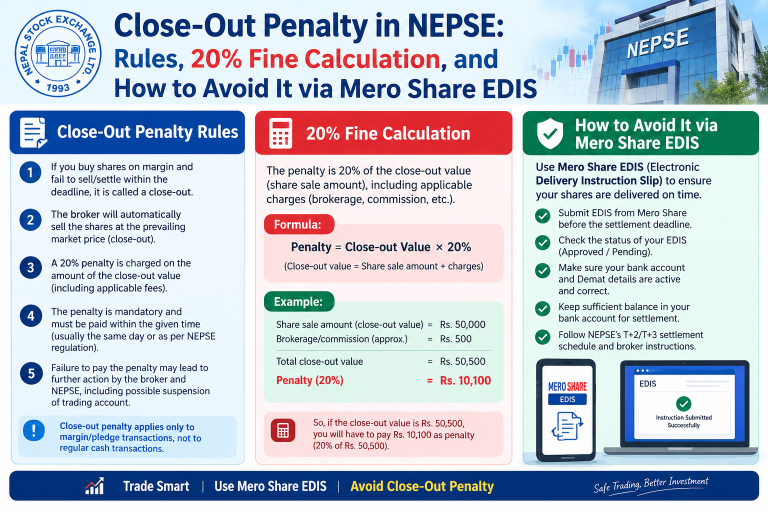
This electronic transfer occurs through the Electronic Depository Instruction Slip (EDIS) feature inside Mero Share. If you fail to complete your EDIS transfer within the stipulated settlement timeline, the clearing system initiates an automatic close-out penalty. This mistake slaps an immediate 20% cash penalty on your gross trade value, wiping out hard-earned profits in seconds.
Whether you are a beginner trading your first secondary market lot or an active investor juggling multiple accounts, here is a detailed breakdown of how the close-out penalty in NEPSE works, how the fine is calculated, and practical safeguards to avoid it every time you trade.
What Is a Close-Out Penalty in NEPSE and CDSC?
A close-out occurs when a seller fails to deliver the required quantity of shares to the clearing house within the prescribed clearing cycle after a trade execution. Because NEPSE does not permit naked short selling, every trade assumes the seller possesses valid, deliverable shares in their Demat account.
When you click “Sell” on your broker’s TMS, the buyer pays money expecting the shares in return. If you fail to push the shares from your Demat pool using Mero Share EDIS, CDSC cannot credit the buyer’s Demat account. To resolve this default and protect market integrity, CDSC cancels the delivery obligation and imposes a statutory 20% financial fine on the defaulting seller based on the total transaction amount.
It is important to understand that a close-out is not a share confiscation. Your original shares remain in your Demat account because they were never transferred. However, the trade is effectively voided, and you are penalized 20% in pure cash, which your stockbroker will recover directly from your trading ledger.
Settlement Timeline (T+2) and Mero Share EDIS Deadlines
NEPSE operates on a strict T+2 rolling settlement cycle (where ‘T’ represents the trading day). Both cash payout and share delivery must conclude within two business days following the trade execution.
To avoid a close-out, you must track how these settlement days work in practice:
- Trading Day (Day T): You execute a sell order on TMS. Once market hours close (3:00 PM), your broker reconciles the daily contracts.
- Day T+1 (First Clearing Day): The trade details appear in your Mero Share portal under the “Purchase Source” and “EDIS” tabs. This is the optimal window to update your Weighted Average Cost of Capital (WACC) and authorize your share transfer.
- Day T+2 (Settlement Deadline): This is the final settlement cutoff. CDSC requires stockbrokers to hand over all client shares to the clearing pool by early afternoon (typically between 12:00 PM and 2:00 PM).
Important Notice on Broker Deadlines:
Although CDSC gives brokers until midday on T+2, most brokerage firms mandate that retail clients complete EDIS by 6:00 PM to 8:00 PM on T+1 (or at the absolute latest, by 10:00 AM on T+2). If you delay past your broker’s internal cutoff, their automated batch script may flag your account as a non-delivery default, triggering the close-out process before you even wake up on T+2.
How the 20% Close-Out Fine Is Calculated (With Example)
The close-out penalty in NEPSE is set at a flat rate of 20% of the total selling value of the default transaction. Let us examine a real-world scenario to see how severely this impacts your pocket.
Example Scenario
Suppose you sell 200 shares of a commercial bank at NPR 600 per share:
- Gross Selling Amount: 200 shares × NPR 600 = NPR 120,000
- Close-Out Rate: 20%
- Total Penalty Levied: 20% of NPR 120,000 = NPR 24,000
In this situation, the trade gets canceled. You keep your 200 shares, but you owe your stockbroker NPR 24,000. If you had an active cash balance in your TMS collateral ledger, the broker automatically debits NPR 24,000. If your ledger balance is zero, your account falls into a negative balance, and your broker will restrict further buying or selling until the fine is cleared.
Where Does the 20% Fine Go?
Under regulatory clearing rules governed by CDSC and the Securities Board of Nepal (SEBON), the penalty amount does not simply sit with your broker. The buyer—who was deprived of their shares due to your settlement failure—receives financial compensation (typically the net penalty amount after standard regulatory deductions and applicable government withholding taxes), while CDSC pools clearing charges.
Common Reasons Investors Face Close-Out on NEPSE
Most investors never intend to default on their share sales. Close-outs typically happen due to negligence, technical misunderstandings, or interface oversights. Here are the primary culprits:
1. Forgetting to Update Purchase Source (WACC)
You cannot directly transfer shares under EDIS without completing your holding history first. Many investors log into Mero Share, check EDIS, see no pending transfers, and log out thinking everything is fine. In reality, you must navigate to My Purchase Source, calculate WACC, and declare your holding duration for Capital Gains Tax (CGT) purposes before the records move into the transfer queue.
2. Confusing Demat Accounts
With many investors maintaining accounts across different commercial banks and capital institutions, it is common to accidentally execute a sell order through a broker tied to Demat Account “A” while the physical shares sit in Demat Account “B”. When you open Mero Share for Account “A”, there are zero shares available for transfer, leading directly to a close-out default.
3. Selling Shares in Freeze Balance
If you recently participated in corporate actions, bonus distributions, or promoter-to-public conversions, your holdings might appear in your portfolio but be classified under “Freeze Balance” rather than “Free Balance”. When you place a sell order on TMS, the system might permit the order entry, but Mero Share cannot debit frozen shares. Unless you learn how to unfreeze shares in Mero Share ahead of time, your delivery will fail.
4. Assuming TMS Automatically Debits Mero Share
Beginners often assume that because their TMS and Demat accounts are linked, selling on TMS automatically transfers the shares out of their account. This is incorrect. TMS is an order matching portal operated by NEPSE, while Mero Share is a depository system managed by CDSC. You must manually instruct Mero Share to release your securities via EDIS every single time you sell.
5. Mero Share Portal Down-Time and Server Load
During heavy bull-run cycles or massive public offering periods, Mero Share servers frequently experience slowdowns or technical glitches in the late evening. If you wait until the last few hours of T+1 or the morning of T+2 to complete your transfer, unexpected server downtime can trap you into an involuntary close-out.
What to Do If You Get Hit by a Close-Out Notice
If you receive an SMS or email from your stockbroker stating that your transaction has entered close-out, panic will not help. Take these concrete steps immediately:
- Verify the Ledger Debit: Log into your broker TMS portal and check your “Financial Statement” or “Ledger”. Identify the exact close-out deduction to ensure the 20% calculation matches your turnover.
- Check Your Demat Holdings: Confirm that the untransferred shares have been retained under your Free Balance. Because the clearing failed, those shares were never transferred to the counterparty.
- Contact Your Broker Settlement Department: If you attempted to complete EDIS on time but experienced proven technical errors from CDSC’s portal (such as universal payment gateway crashes or system maintenance outages), provide screenshots and timestamps to your broker’s compliance officer. While regulatory rules make penalty waivers rare, verified clearing-house system defaults can sometimes be appealed through CDSC.
- Clear the Negative Balance: To prevent your broker from freezing your TMS trading profile or blocking future buy orders, deposit the penalty deficit into your broker account via connectIPS or bank transfer.
Step-by-Step Checklist to Avoid Close-Out Penalties Every Time You Sell
Following a disciplined operational checklist whenever you trade on NEPSE eliminates close-out risks entirely. Make this three-step workflow your standard routine:
Step 1: Verify Available Free Balance Before Placing an Order
Before launching your broker TMS platform to hit the sell button, open your Mero Share portal. Navigate to My Portfolio and inspect the stock you intend to liquidate. Confirm that the quantity you want to sell is listed under Free Balance and not locked under pledge or freeze.
Step 2: Complete WACC and Holding Period on Day T
Do not wait for T+1. On the very afternoon you make your trade (between 5:00 PM and 8:00 PM on Day T), log into Mero Share:
- Go to My Purchase Source.
- Search for the scrip, select the matching purchase lots, and click Calculate WACC.
- Proceed to My Holding Result, verify whether your holding is Short Term (≤ 365 days) or Long Term (> 365 days), and submit the declaration.
Step 3: Authorize Share Transfer via EDIS Immediately
Follow our comprehensive tutorial on how to transfer shares using Mero Share EDIS:
- Navigate to My EDIS on the left-hand menu.
- Click on Transfer Shares.
- Select the settlement ID corresponding to your day’s sell transaction.
- Tick the scrip box, confirm the total volume, and submit.
- Refresh your screen and open the Transfer History tab. Ensure the status reads Transferred / Success rather than remaining in “Pending” status.
Conclusion
Trading on NEPSE requires not just market timing, but operational diligence. Missing an EDIS deadline turns an otherwise profitable trade into a frustrating loss via CDSC’s non-negotiable 20% close-out penalty. By completing your Purchase Source declarations and EDIS transfers on the evening of the trade day (T) rather than delaying until the final cutoff on T+2, you safeguard your portfolio against costly human oversights and server outages.
Frequently Asked Questions (FAQs)
What is the exact deadline to complete EDIS after selling shares in Nepal?
Officially, CDSC requires final share clearance on T+2 (the second working day after trading). However, retail investors must complete their EDIS instructions on Mero Share much earlier—usually by the evening of T+1 (around 6:00 PM to 8:00 PM) or at the latest by 10:00 AM on T+2—depending on your individual broker’s operational cutoff.
Who receives the 20% close-out penalty amount in NEPSE?
The 20% penalty paid by the defaulting seller is primarily credited to the buyer who purchased the shares but never received them due to non-delivery. A portion is withheld for government taxes and clearing administrative charges, while the net remainder is credited to the buyer’s trading ledger as compensation.
Can a broker reverse a close-out penalty once issued?
No. Stockbrokers cannot reverse close-out penalties on their own authority. The close-out process is an automated, systemic action executed at the clearing-house level by CDSC under SEBON regulations. Unless CDSC officially acknowledges an unprecedented nationwide system blackout during settlement hours, close-out penalties are final and non-refundable.
Does close-out happen if my shares are locked in freeze balance during EDIS?
Yes. If your shares are locked in “Freeze Balance” (due to an active IPO lock-in period, court freezes, bank collateral pledge, or unverified script documentation), Mero Share cannot deliver them during the EDIS transfer. Even if your portfolio shows the total share count, only “Free Balance” can be transferred. If the freeze is not cleared before settlement, the trade defaults and triggers the 20% close-out penalty.
Do I lose my shares if a close-out occurs?
No, you do not lose your physical or dematerialized shares. Because the delivery failed, the shares were never removed from your Demat pool. They stay in your account, but you are penalized 20% of the gross sale turnover in pure cash.
How does the broker deduct the close-out fine?
Your stockbroker debits the 20% penalty directly from your TMS client trading ledger. If you have pending sales payouts, they will deduct the fine from that balance. If your ledger does not have sufficient cash, your balance goes negative, requiring you to deposit the owed amount via connectIPS or bank transfer before you can trade again.