Selling shares on the Nepal Stock Exchange (NEPSE) through your broker’s Trade Management System (TMS) feels great when you lock in a profit. However, pressing the “Sell” button is only half the transaction. In Nepal’s electronic clearing system, you must deliver those shares from your Demat account to your broker using Electronic Delivery Instruction Slip (EDIS) on Mero Share.
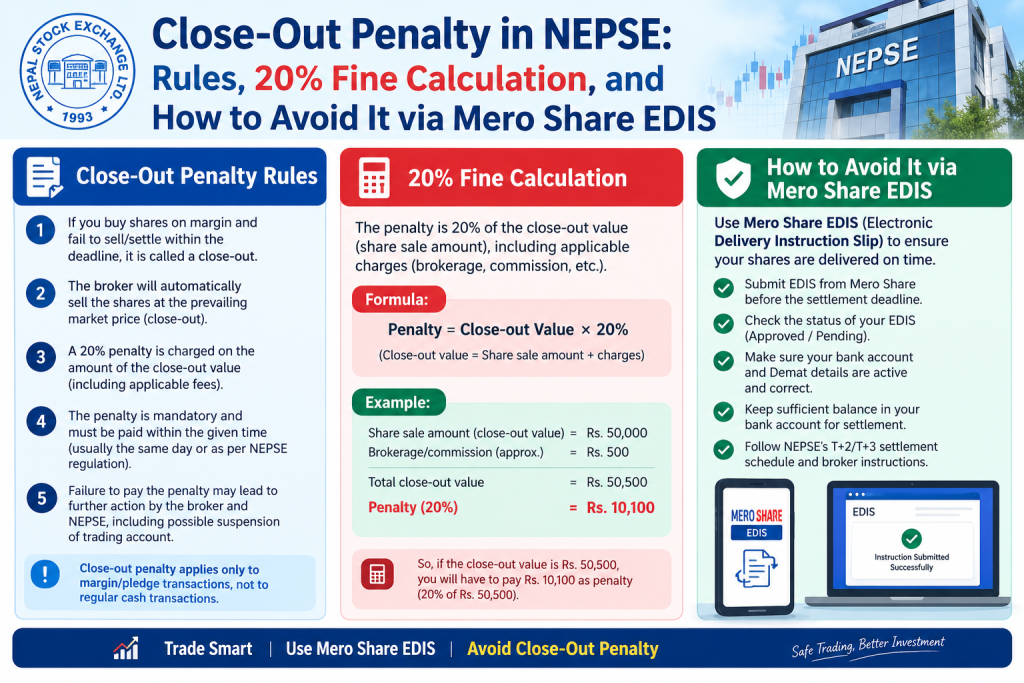
If you fail to deliver those sold units within the stipulated clearing deadline, CDS and Clearing Limited (CDSC) triggers an automated penalty mechanism known as Close-Out. This results in a heavy, non-negotiable 20% fine levied directly on the seller. For retail investors and beginner traders, close-out penalties can quickly wipe out trading gains and cause serious financial frustration.
In this comprehensive guide, we will break down what the close-out penalty in NEPSE is, why it occurs, how the 20% fine is calculated with practical examples, settlement timelines, and actionable steps to ensure you never face an EDIS default.
What Is Close-Out Penalty in NEPSE?
A close-out occurs when an investor sells shares on the secondary market but fails to deliver the corresponding securities to the clearing house (CDSC) within the prescribed settlement window. Because the buyer on the other end of the transaction has already paid for the purchase, the exchange cannot leave the buy order unfulfilled.
Since naked short selling is strictly prohibited under current Securities Board of Nepal (SEBON) regulations, every sell order must be backed by actual shares residing in the seller’s Demat account. When a seller defaults on delivery, the trade cannot be settled with actual shares. To resolve this default, CDSC cancels the physical transfer of shares, returns the buyer’s funds, and imposes a mandatory 20% cash penalty on the defaulting seller based on the transaction amount.
Why Does Close-Out Happen in the Nepali Stock Market?
Close-outs in NEPSE rarely happen because traders deliberately attempt to manipulate the market. In most cases, they stem from minor oversights, technical issues, or misunderstandings of clearing rules. The most common causes include:
- Forgetting to complete EDIS: Selling shares on TMS and assuming the process is automatic. Investors forget that Mero Share requires manual authorization via EDIS after updating WACC.
- Selling shares held in another Demat account: Many active traders maintain multiple accounts. If you sell shares through Broker A linked to Demat Account 1, but your shares actually sit in Demat Account 2, your EDIS transfer will fail.
- Selling frozen or locked-in shares: If your shares are restricted due to lock-in periods (such as promoter shares, mutual fund quotas, or employee reservations), they sit under “Freeze Balance” rather than “Free Balance”. If sold accidentally, they cannot be transferred. Read our guide on how to unfreeze shares in Mero Share to avoid this issue.
- Mero Share server downtime: High trading volumes occasionally lead to server slow-downs or gateway timeouts on Mero Share during peak evening hours, causing investors to miss the settlement cutoff.
- Discrepancies in Name or BOID: Mismatches between your TMS profile and your Beneficiary Owner Identification (BOID) can block transfers.
How Much Is the Close-Out Fine? (20% Rule Explained with Example)
Under clearing regulations established by CDSC and approved by SEBON, the close-out penalty is fixed at 20% of the total contract value of the defaulted shares.
Let us look at a realistic numerical scenario to understand how painful this penalty can be:
Scenario: Default on Hydropower Shares
- Company Sold: 500 units of XYZ Hydropower
- Selling Price per unit: NPR 400
- Gross Turnover (Contract Value): 500 × NPR 400 = NPR 200,000
If the seller forgets to perform EDIS within the prescribed deadline, the trade goes into close-out:
- Close-Out Penalty Rate: 20%
- Penalty Amount: 20% of NPR 200,000 = NPR 40,000
Where Does the 20% Penalty Money Go?
A common question among Nepali investors is who profits from this steep fine. The 20% penalty collected from the defaulting seller is split as follows:
- The Buyer (Receives the majority): In the secondary market, the buyer did not receive the shares they purchased due to the seller’s fault. To compensate for lost opportunity, roughly 75% to 80% of the fine (subject to prevailing CDSC bylaws and applicable tax deductions) is credited directly to the buyer’s broker/account.
- CDSC and NEPSE / Investor Protection Fund: The remaining portion is allocated toward exchange administrative fees, clearing charges, and the clearing pool reserve fund.
Note: Any compensation received by a buyer through a close-out settlement may be subject to Advance Tax or TDS deductions as per prevailing tax laws.
NEPSE Settlement Timeline: Understanding the T+2 EDIS Deadline
NEPSE operates on a standard T+2 rolling settlement cycle (where “T” represents the actual transaction day). For smooth settlement, CDSC requires sellers to transfer shares electronically before the clearing session concludes.
| Timeline Stage | Action Required | Status |
|---|---|---|
| T (Trade Day) | Sell order executes on NEPSE TMS. | Trade matched. |
| T+1 (Day 1 after Trade) | Calculate WACC, update holding period, and submit EDIS on Mero Share. | Safest time to transfer. |
| T+2 (Settlement Day) | Final clearing session (usually by 10:00 AM – 11:00 AM). | Final deadline before close-out triggers. |
While clearing technically occurs on T+2, waiting until T+2 morning is extremely risky. Most brokerage houses send batch instructions to CDSC by 5:00 PM on T+1. If Mero Share experiences downtime on the morning of T+2, you will miss the clearing cut-off, and your trade will instantly slip into default.
Step-by-Step: How to Avoid Close-Out Using Mero Share EDIS
Transferring your shares on time is straightforward if you build a consistent post-trade habit. For a detailed walkthrough, follow our complete guide on how to transfer shares using Mero Share EDIS. Here is the essential routine:
Step 1: Calculate and Submit Your WACC
Before Mero Share lets you transfer sold shares, you must declare your purchase cost to determine your Capital Gains Tax (CGT) liability. Log into Mero Share, navigate to My Purchase Source, search for the scrip you sold, calculate the Weighted Average Cost of Capital (WACC), and click submit. You can also refer to our guide on how to calculate WACC in Mero Share.
Step 2: Update Your My Holding Period
Right below Purchase Source, select My Holding. Check the box beside the scrip to confirm whether your holding duration is short-term (less than 365 days, taxed at 7.5%) or long-term (more than 365 days, taxed at 5%). Confirm and save your details.
Step 3: Transfer via EDIS
Go to the My EDIS section on the left navigation panel:
- Click on Transfer Shares.
- Under the “Settlement” tab, locate the trade contract matching your sale.
- Select the checkbox next to the scrip and verify that the quantity matches your execution on TMS.
- Click Proceed, agree to the terms, and confirm the transfer.
- Verify that the status moves to Success / Approved.
Always execute this entire sequence by 7:00 PM on the evening of your trade day (T) or by midday on T+1.
What to Do If You Receive a Close-Out Penalty Notice from Your Broker
If you receive an SMS or email from your stockbroker informing you that a trade has suffered a close-out, take the following steps immediately:
- Do not panic, but do not ignore it: Your broker will adjust the 20% penalty against your ledger. If you have an existing cash balance with your broker, the penalty is deducted automatically. If your account runs a debit balance, you will be required to deposit the fine via ConnectIPS or bank transfer.
- Confirm you still have the shares: In a close-out, your original shares were never debited from your Demat account. Check your Mero Share portfolio. The 500 units from our example above are still yours. You can keep them or sell them again at current market rates.
- Contact your broker’s settlement department: If you performed EDIS before the official deadline but encountered a registered CDSC system crash, request your broker to verify the electronic timestamp logs. While reversals are very rare, broker documentation is vital if widespread exchange downtime caused the delay.
Best Practices for Active NEPSE Traders to Prevent EDIS Failures
To keep your portfolio safe from unexpected penalties, integrate these professional trading habits into your daily routine:
- Set a Post-Market Alarm: Set an alert on your phone for 4:00 PM every trading day. Once NEPSE closes, immediately log into Mero Share to finalize WACC, Holding Period, and EDIS.
- Double Check Demat Numbers Before Placing Orders: If you trade using multiple broker accounts or hold different Demat accounts, confirm that the TMS portal you are using is linked to the exact Demat account that holds the shares.
- Check Your Free Balance First: Before short-term swing trading, open Mero Share’s My Portfolio tab to verify that the shares you intend to sell are listed under Free Balance, not frozen due to margin pledges or lock-in regulations.
- Keep Your Contact Information Updated: Ensure your phone number and email are current in both TMS and Mero Share so you never miss settlement alert notifications from CDSC or your broker.
Frequently Asked Questions (FAQs)
What is the exact percentage of the close-out penalty in NEPSE?
The close-out penalty in NEPSE is exactly 20% of the total transaction turnover value of the defaulted shares. This rate is fixed by CDSC clearing bylaws and regulated by SEBON.
Who receives the 20% close-out penalty amount in Nepal?
The majority of the penalty (typically around 75%–80%, subject to statutory deductions) is paid to the buyer as financial compensation for the unfulfilled share delivery. The remaining portion goes to CDSC and NEPSE clearing pools to cover operational and settlement risk charges.
What is the last deadline to complete EDIS on Mero Share after selling shares?
The safest deadline to finish your EDIS transfer is by T+1 (the day after your trade) before 5:00 PM. While final clearing technically runs on the morning of T+2, technical glitches, portal traffic, and batch settlement cutoffs make waiting until T+2 highly hazardous.
Can you cancel a close-out penalty if it was caused by a Mero Share server issue?
Under normal circumstances, CDSC rarely waives close-out penalties. However, if CDSC officially acknowledges an unannounced nationwide technical outage that prevented all investors from accessing EDIS, they may issue an emergency extension or waive specific batch defaults. For isolated internet or device issues on the user’s end, the fine cannot be cancelled.
Does NEPSE deduct the close-out fine automatically from your sales proceeds?
Because the share transfer failed, you do not receive any sales proceeds for those shares. Instead, your stockbroker will bill your ledger for the 20% penalty amount. If you have credit funds in your broker account, it will be deducted automatically; otherwise, you must pay the debit balance manually to keep your trading account active.