There is nothing more frustrating for an investor in Nepal than missing out on an Initial Public Offering (IPO) because of technical glitches. You have analyzed the company, prepared your funds, and logged in at the final hour, only to discover that your Mero Share Login Not Working as expected. Whether you are facing an infinite loading screen, receiving an “Invalid Credentials” error, or experiencing a complete system timeout, login failures on the Mero Share portal can derail your investment plans fast.
Mero Share, managed by CDS and Clearing Limited (CDSC), is the centralized platform used by millions of Nepali investors to apply for IPOs, FPOs, rights shares, and view their Demat portfolios. Because of this massive user base, the platform frequently experiences technical strain. In this comprehensive guide, we will break down the exact reasons why your Mero Share login is failing today and provide verified, step-by-step solutions to get your account back online immediately.
Why Is Your Mero Share Login Not Working? (Common Root Causes)
Before jumping into solutions, it is essential to understand why the portal fails. Identifying the root cause saves time and prevents unnecessary password resets. Based on system logs and frequent user reports, most login errors stem from five main issues:
- High Traffic & CDSC Server Congestion: When a highly anticipated IPO opens or reaches its closing date, hundreds of thousands of users attempt to log in simultaneously. This traffic spike overloads CDSC servers, resulting in page timeouts, 502 Bad Gateway errors, or unresponsive login buttons.
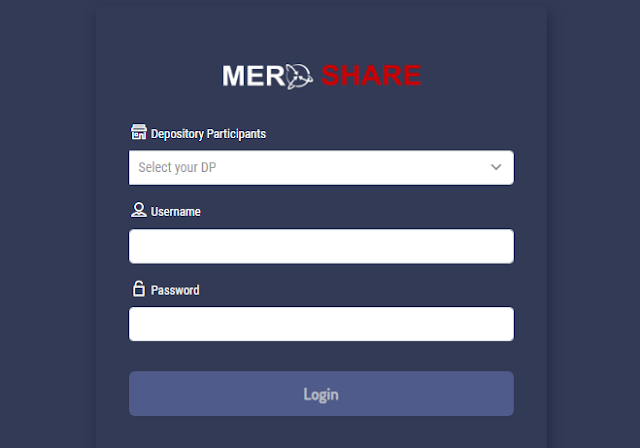
- Incorrect Credentials or Capital Selection: Mero Share requires four key inputs: your Depository Participant (DP), Username, Password, and Transaction PIN. Selecting the wrong DP from the drop-down list or failing to recognize upper/lowercase letters in your password will trigger login failures.
- Expired Mero Share or Demat Account: Both your Demat account and Mero Share subscription require annual renewals. If your account has expired (typically at the end of the Nepali fiscal year in mid-July), CDSC temporarily suspends login access until the renewal fees are paid.
- Corrupted Browser Cache and Session Cookies: Web browsers store temporary files to load websites faster. However, outdated security tokens or corrupted cookies from previous Mero Share updates can break the authentication handshake between your browser and the server.
- Scheduled Maintenance by CDSC: CDSC routinely updates Mero Share servers to enhance database security, release new features, or integrate with new DP portals. During these maintenance windows, access is temporarily disabled across both web and mobile applications.
Step-by-Step Solutions to Fix Mero Share Login Issues
If you are currently locked out of your account, follow these proven troubleshooting steps in sequential order to regain access quickly.
1. Clear Browser Cache or Switch to Incognito Mode
Corrupted local data is the leading cause of individual login failures when the main server is operational. To rule this out instantly, open a new Incognito Window (Private Browsing) in Google Chrome, Mozilla Firefox, or Safari, and try visiting meroshare.cdsc.com.np.
If the login succeeds in private mode, you need to clear your primary browser cache:
- Open Chrome settings and navigate to Privacy and Security.
- Click on Clear Browsing Data.
- Select Cached images and files and Cookies and other site data.
- Set the time range to “All Time” and click Clear Data.
- Restart your browser and attempt to log in again.
2. Verify Your Depository Participant (DP) and Credentials
It sounds simple, but thousands of users fail to log in simply because the wrong DP is selected. Mero Share defaults or resets the DP selection box upon refreshing the page. Always double-check that your correct capital bank or broker DP name is chosen from the drop-down menu before typing your details.
If you suspect your password is incorrect, click on the “Forgot Password?” link on the main login screen. Enter your registered DP, Username, Email Address, and Date of Birth to receive a temporary reset link. Remember that passwords on Mero Share are case-sensitive.
3. Toggle Between the Web Portal and Mobile Application
Mero Share operates via both web browser and dedicated mobile applications for Android and iOS. Occasionally, the web frontend experiences heavy load while the application API remains functional, or vice versa. If the desktop website fails to load, download the official Mero Share App from the Google Play Store or Apple App Store, turn off your Wi-Fi, connect via cellular data, and attempt to log in.
4. Check Account Renewal Status
If your login fails with account suspension notifications, your annual subscription may have lapsed. Mero Share access costs NPR 50 per year, while Demat account maintenance costs NPR 100 per year.
You can renew your accounts online through major payment gateways in Nepal, including eSewa, Khalti, IME Pay, or ConnectIPS. Simply search for “Mero Share Renewal” inside your digital wallet app, enter your Demat number (BOID), pay the designated fee, and your account will be reactivated within a few hours.
Quick Troubleshooting Matrix: Error vs. Solution
Refer to this quick reference guide to identify your exact error message and apply the appropriate resolution immediately:
| Error Message / Symptom | Primary Cause | Recommended Action |
|---|---|---|
| “Invalid Credentials” | Wrong DP, Username, or Password | Verify DP selection; reset password via email if issue persists. |
| Infinite Loading / Blank White Screen | Browser cache issue or server crash | Use Incognito Mode or clear browser cache; retry on mobile data. |
| “Account Expired” Notice | Unpaid annual Demat/Mero Share fee | Pay renewal fees through eSewa, Khalti, or ConnectIPS. |
| 502 Bad Gateway / Network Error | CDSC server overload or maintenance | Wait 30-60 minutes; apply during off-peak hours (early morning/late night). |
Preventative Steps to Avoid Future Login Disruptions
To ensure you never miss a critical IPO application window due to technical errors, adopt these standard practices:
- Apply Early: Never wait until the final hours of an IPO deadline. Server traffic peaks significantly between 3:00 PM and 5:00 PM on closing days. Applying on Day 1 or Day 2 guarantees a smooth transaction.
- Keep Account Credentials Updated: Save your BOID, DP name, password, and transaction PIN securely in a password manager so you do not make repetitive typing mistakes under pressure.
- Pre-pay Renewal Fees: Renew your Demat and Mero Share accounts before the end of Ashadh (mid-July) to avoid automatic system lockouts during peak fiscal transitions.
- Contact Your DP Promptly: If self-service resets fail, reach out directly to your capital bank’s Demat department via phone or email. They have administrative privileges to manually reset your Mero Share access and update your contact records.
Frequently Asked Questions (FAQs)
Why does Mero Share say “Invalid Credentials” even when my details are correct?
This error usually occurs when the selected Depository Participant (DP) resets to default upon page reload, or when your password contains caps-lock errors. Additionally, if you recently reset your password, temporary cache stored in your browser might submit outdated login information automatically. Try logging in using an Incognito tab.
How do I renew my expired Mero Share account online if I cannot log in?
You do not need to log into Mero Share to renew your account. Open any supported digital wallet (such as eSewa, Khalti, or IME Pay) or ConnectIPS, navigate to the Financial Services/Mero Share section, enter your 16-digit BOID number, select the number of years you wish to renew, and complete the payment. Your account access will be automatically restored once processed.
What should I do if the Mero Share website is completely down during an IPO deadline?
When server overload grounds the primary website, switch to the official Mero Share mobile app using mobile data instead of Wi-Fi. If the issue is widespread across all channels, CDSC often extends the IPO deadline. Monitor official press releases from CDSC or your financial news portals for announcements regarding application extensions.
Conclusion
Dealing with a Mero Share login not working issue can be stressful, especially when an attractive IPO issue is closing soon. Fortunately, most access problems can be resolved quickly by switching to Incognito mode, double-checking your DP selection, clearing your browser cache, or renewing your annual subscription online.
Stay ahead of market opportunities by completing your account renewals early and submitting your IPO applications as soon as issues open. Bookmark this troubleshooting guide so you are always prepared to fix technical glitches before the next major market opportunity arrives!